Explore our next generation products
Built for developers and teams in the agent-first era
Everything you need to stay up-to-date and get help
Subagents, hooks, scheduled tasks, agent management, voice, and much more


The launches of Google Antigravity 2.0 and the Google Antigravity CLI are coming with a whole host of new capabilities across the core agent, agent management, and UI/UX.
In this blog post, we walk through a few highlights.
Core agent features
Subagents
Antigravity now supports subagents beyond just the single specialized browser subagent. Subagents are now modular, specialized, or blank-slate assistant agents spawned programmatically by the main agent. They can be built-in roles, generic clones (take on the same prompt and environment as the main agent), or dynamically registered on the fly (that is, the main agent defines the subagent’s goal as required by the currently active task). Subagents inherit tool configurations and security permissions from the main agents, ensuring they have the rights to perform the designated tasks, but no more.
Subagents allow for parallelization with workspace isolation, meaning chunkier tasks get completed quicker, and often better since the main agent’s context window is not polluted with multiple active threads of work.
Asynchronous task management
Historically, some operations (for example, installing npm packages) would take a long time and block the agent from doing future work (for example, writing the application code). Antigravity’s agents now support asynchronous task management, which means that these long-running operations are offloaded to a background process so they do not block the main agent’s active loop or the user interface.
Subagents can also be run as asynchronous background tasks! In such a world, the main agent’s handler invokes the subagents and immediately yields control back to the user. The background task sets up an intercepting message client to catch and stream subagent responses back to the main agent’s progress log in real-time. The background task then loops and polls the subagent states periodically. Once all subagents have finished their execution, the background task concludes.
Hooks
Hooks allow users to execute custom local shell scripts at critical stages of an Antigravity agent’s execution cycle, such as before a tool execution (can help customize arguments), after a tool execution (useful for logging), before a model call (to inject system instructions), after a model call (to override exit rules), or at agent loop stopping conditions (to force checks or block termination). Antigravity now supports both global hooks and workspace-specific hooks, with the latter taking precedence if it exists, stored in JSON files. Check out the documentation for details on schemas and expected file locations.
Agent management
We are introducing the core agent management primitive of a “project.” A project controls the settings (that is, how should the agent behave overall?), available resources (that is, what does the agent have access to?), and permissions (that is, is the agent allowed to take a certain action?) for all agents that are invoked within that project.
Since agents are no longer tied to a single repository for organization and management reasons, users can make multiple local folders available to the agents in a particular project. Projects allow users to have appropriately scoped settings and permissions for different agents, as opposed to requiring the user to adopt the most broad permissions out of any task for all agents. By default, each project adopts your global permissions. These can be augmented at the project level, and settings must be explicitly set at the project level. The default settings are an Antigravity-defined set of standard, conservative settings.
If you have a simple one-off task that doesn’t require a project, you can also start a “standalone” agent (using “New Conversation” without selecting a project). These agents adopt your global permissions and the Antigravity-defined standard settings, with the resulting conversations appearing in a separate section in the left side panel.
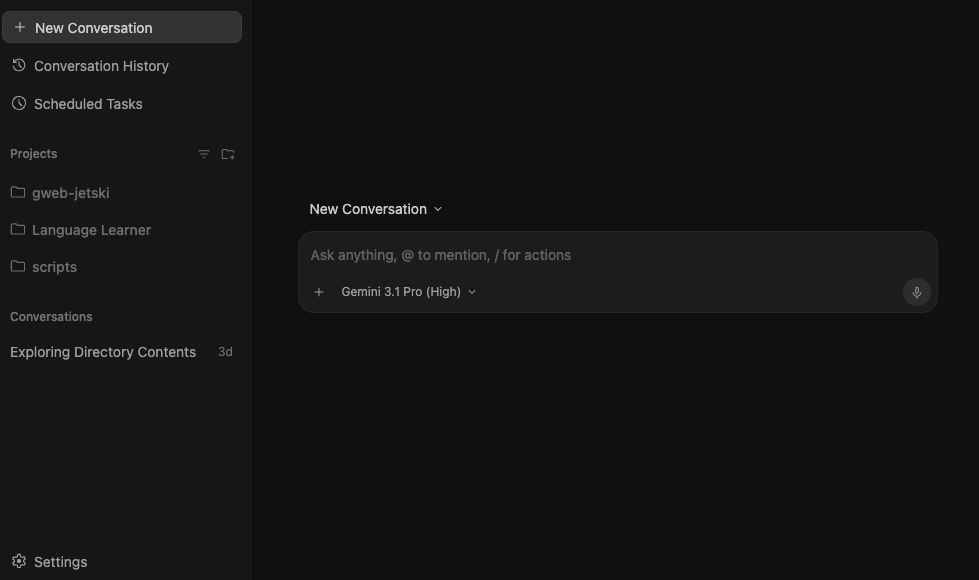
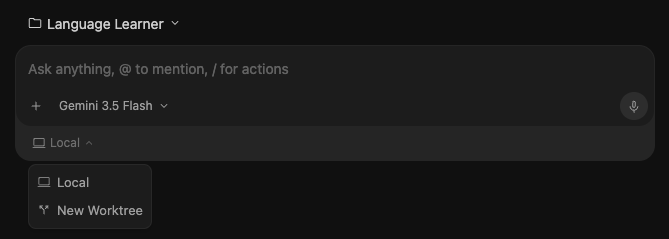
Speaking of the left side panel, it has been revamped to allow for easier sorting and identification. You can now group conversations by project, status, or recency, change the display name of projects, and toggle on worktree names. Speaking of which, Antigravity 2.0 comes with native Git worktree support! Just select “New Worktree” when starting a conversation, and Antigravity handles first provisioning a worktree in the background before starting the conversation in that new worktree path, keeping your active directory clean. Fun fact: if the main agent delegates to multiple subagents that need to work in isolation, it autonomously creates the worktrees for those conversations and handles cleanup automatically.
Scheduled tasks
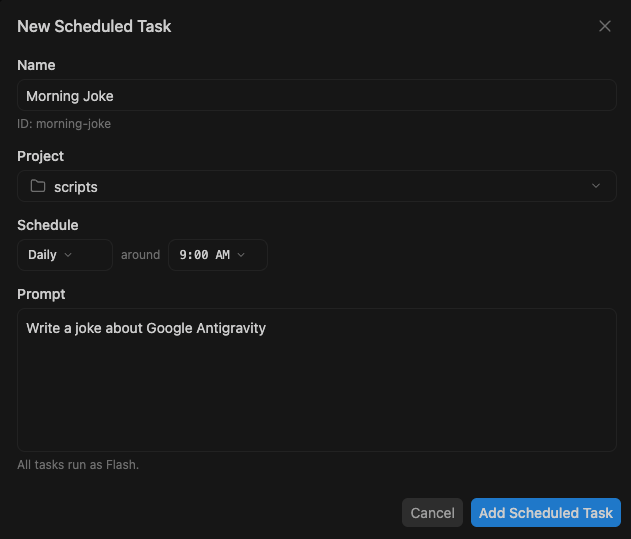
Scheduled Tasks allow you to set crons for prompts that you would like agents to tackle periodically, without requiring your manual prompting or invocation. These could be for daily digests on open pull requests, hourly checks on live deployments, monthly reports on system architecture changes, and more.
You simply set the schedule, prompt, and project, and the agents launch in the background accordingly, with resulting conversations appearing in the sidebar. You can continue interacting with any of these agents, allowing for a seamless handoff from asynchronous to human-in-the-loop:
Execute custom scripts during agent cycles with Hooks.
Agents invoked by Scheduled Tasks are fixed to use Gemini 3.5 Flash, and we plan to explore adding model selection in the future.
Voice
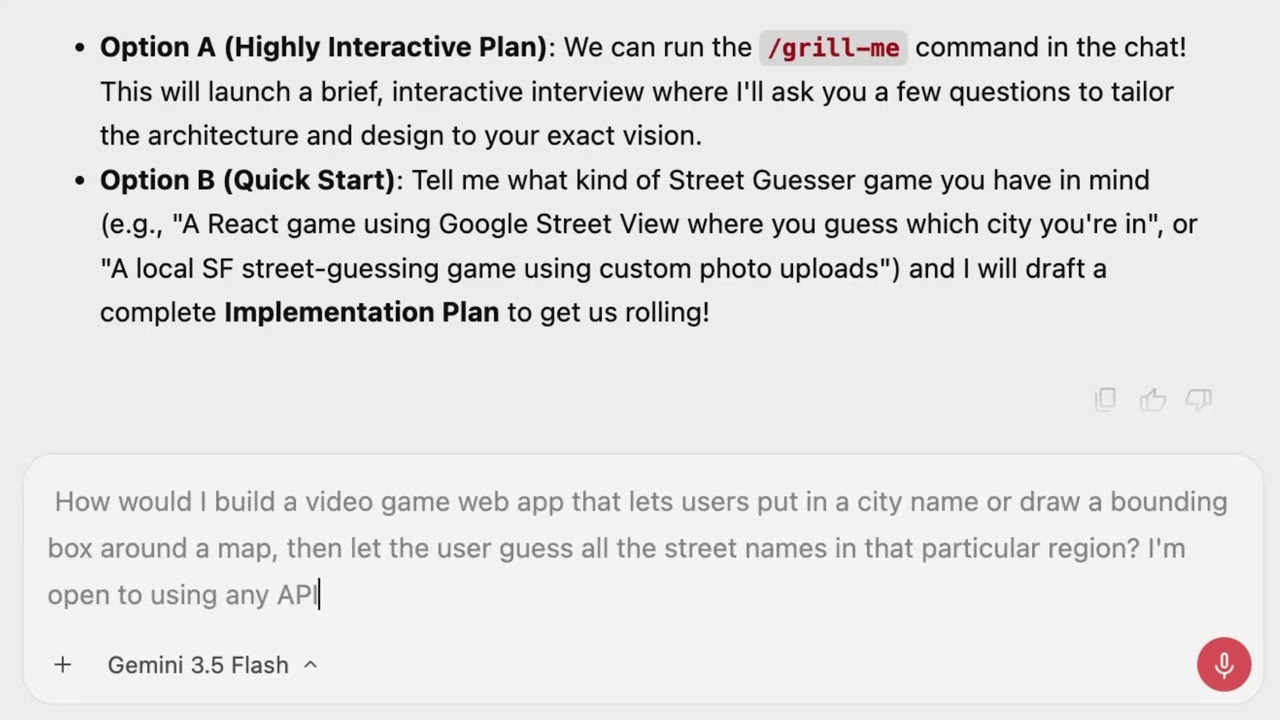
Studies show that humans average 50 words-per-minute by typing and 150 words-per-minute by talking. More and more Googlers are adopting voice as their preferred input modality. In Antigravity 2.0, we are introducing live transcription using the latest Gemini Audio models to all tiers. Just click the mic icon next to text input boxes in the product and prompt away. One of the most powerful aspects of the new Gemini Audio model is that it is able to convert rambling speech into clearly phrased text. Now you don’t have to spend time on stylistic edits of the input before sending the prompt to the model. You are also able to make any edits before sending the prompt if you want to add additional information or there were minor errors in the transcription.
Live voice transcription.