

Status line customization
Section titled “Status line customization”Define custom scripting configurations and format dynamic JSON state payloads to customize your TUI status line.
Overview
Section titled “Overview”The status line is positioned at the bottom of the TUI prompt panel. It provides at-a-glance context regarding active agent cycles, workspace environments, context token window usages, and background execution tasks.
Custom status line scripting
Section titled “Custom status line scripting”For advanced terminal layouts or custom status bar displays, you can route active agent metadata into a custom script.
Configuration
Section titled “Configuration”Add a statusLine configuration block to your ~/.gemini/antigravity-cli/settings.json file:
{
    "statusLine": {
        "type": "command",
        "command": "~/.gemini/antigravity-cli/statusline.sh"
    }
}
Whenever the agent state changes, the CLI runs your command with sh -c (cmd /c on Windows), pipes the session state as JSON to its stdin, and shows what the command prints to stdout in the status line. Multi-line output and ANSI color codes are supported, and a leading ~ in command expands to your home directory.
The statusLine block accepts these properties:
command(string): Shell command that prints the status line.type(string, default"command"): Optional."command"is the only supported type.padding(integer, default0): Number of blank lines above the status line.enabled(boolean, defaulttrue): Set tofalseto stop runningcommandand show the built-in status line instead. The command stays insettings.json.stack_with_default(boolean, defaultfalse): Whentrue, shows your status line below the built-in one instead of replacing it.
Set statusLine to an object, not to true or false. The CLI reads a boolean as an object without a command, so no script runs.
Available JSON fields
Section titled “Available JSON fields”The JSON payload piped to your script contains the following top-level fields:
| Field | Type | Description |
|---|---|---|
cwd | string | Directory the CLI was started in. |
session_id | string | Same value as conversation_id, kept for compatibility. |
conversation_id | string | ID of the active conversation (empty before the first one starts). |
conversation_title | string | Title of the active conversation (omitted until it has one). |
transcript_path | string | Path where the conversation transcript is written (the file may not exist yet). |
model | object | Contains id, display_name, and effort (low through max, only for models with several effort levels). null until a model is selected. |
workspace | object | Contains current_dir and project_dir paths. |
version | string | CLI version string. |
context_window | object | Contains token usage details: total_input_tokens, total_output_tokens, context_window_size (0 if unknown), used_percentage, remaining_percentage, and current_usage (null before the first model response). |
exceeds_200k_tokens | bool | True if the conversation context has exceeded 200,000 tokens (null before the first model response). |
agent | object | Contains the name of the active agent (omitted for the default agent). |
product | string | Application name (antigravity). |
quota | object | Maps quota bucket IDs to their status: remaining_fraction or remaining_amount, reset_time, reset_in_seconds, and disabled (optional). |
agent_state | string | Current state: idle, working, tool_use, reviewing, authenticating, initializing, or error. |
vcs | object | Version control type: git, jj, or hg (omitted outside a repository). |
cycle_mode | string | Mode selected with Shift + Tab: accept-edits, auto, or plan (omitted in the default mode). |
sandbox | object | Contains enabled, which is true while the terminal sandbox is on. |
subagents | array | Running and finished subagents, each with name, role, and status (running or completed). |
artifact_count | int | Number of artifacts produced in the conversation (omitted when 0). |
plan_tier | string | Subscription tier of the authenticated user (optional). |
email | string | Email address of the signed-in account. |
pending_input_count | int | Number of queued user messages (omitted when 0). |
tool_confirmation_pending | bool | True when a tool confirmation dialog is showing (omitted otherwise). |
task_count | int | Number of running background tasks (omitted when 0). |
terminal_width | int | Live width of the interactive terminal. |
vim | object | Vim editing state: mode is NORMAL, INSERT, VISUAL, or VISUAL LINE. Present only when Vim editor mode is enabled. |
cost | object | Estimated spend in US dollars: total_usd (including subagents), subagent_usd, and estimated. These are estimates based on list prices, not billed amounts (omitted until a cost is reported). |
JSON payload example
Section titled “JSON payload example”Here is a sanitized, typical JSON payload piped to your status line script:
{
    "cwd": "/home/user/my-project",
    "session_id": "12345678-abcd-ef01-2345-6789abcdef01",
    "conversation_id": "12345678-abcd-ef01-2345-6789abcdef01",
    "transcript_path": "/home/user/.gemini/antigravity/brain/12345678-abcd-ef01-2345-6789abcdef01/.system_generated/logs/transcript.jsonl",
    "conversation_title": "Explain the factorial function",
    "model": {
        "id": "Gemini 4 Argon (Medium)",
        "display_name": "Gemini 4 Argon (Medium)",
        "effort": "medium"
    },
    "workspace": {
        "current_dir": "/home/user/my-project",
        "project_dir": "/home/user/my-project"
    },
    "version": "1.4.5",
    "context_window": {
        "total_input_tokens": 88244,
        "total_output_tokens": 61074,
        "context_window_size": 1048576,
        "used_percentage": 14.24,
        "remaining_percentage": 85.76,
        "current_usage": {
            "input_tokens": 63382,
            "output_tokens": 346,
            "cache_creation_input_tokens": 0,
            "cache_read_input_tokens": 20857
        }
    },
    "exceeds_200k_tokens": false,
    "product": "antigravity",
    "quota": {
        "gemini-weekly": {
            "remaining_fraction": 0.9378,
            "reset_time": "2026-07-06T07:50:32Z",
            "reset_in_seconds": 560580
        }
    },
    "agent_state": "idle",
    "vcs": {
        "type": "git"
    },
    "cycle_mode": "plan",
    "sandbox": {
        "enabled": false
    },
    "artifact_count": 2,
    "plan_tier": "Pro",
    "email": "developer@example.com",
    "task_count": 1,
    "terminal_width": 111,
    "cost": {
        "total_usd": 0.4213,
        "subagent_usd": 0,
        "estimated": false
    }
}
Example script
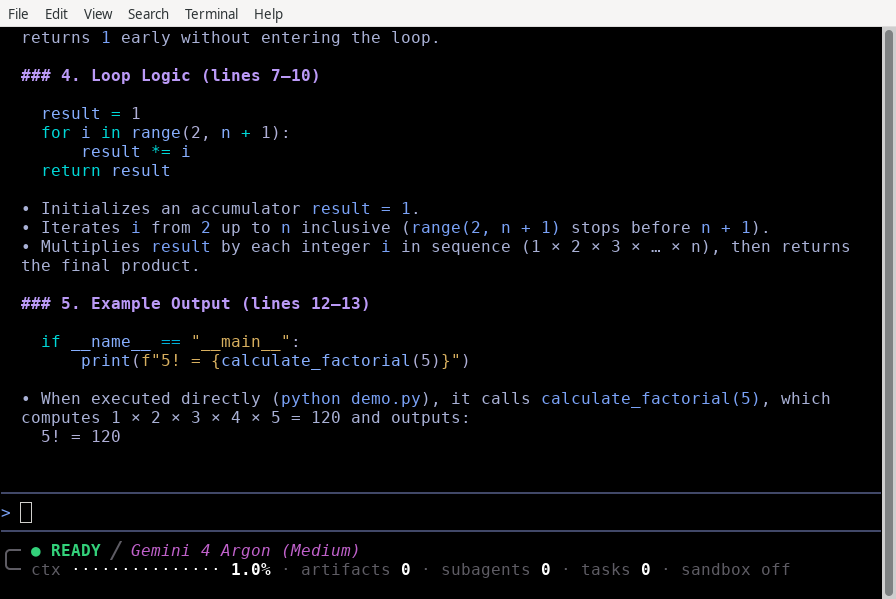
Section titled “Example script”You can download a complete, layout-adaptive script from the official statusline.sh example on GitHub. This script shows the agent state, the model, a context window usage bar, and counts of artifacts, subagents, and background tasks.
Save the script to ~/.gemini/antigravity-cli/statusline.sh and make it executable:
chmod +x ~/.gemini/antigravity-cli/statusline.shWith the script configured, your status line replaces the built-in one below the prompt box:
See also
Section titled “See also”Explore the following guides to customize other CLI elements:
- Status line command: Toggle status line elements interactively.
- Terminal title customization: Configure dynamic window titles.
- Settings, rendering, and keybindings: Customize keyboard hotkeys and buffers, and see every
statusLineproperty. - CLI reference: Quick reference for slash commands, keybindings, and configuration keys.
- Permissions and sandbox: Manage secure directory permissions.